As a seasoned tech blogger who’s spent years deep in the trenches of automation tools… from the early days of Zapier to the modern era of autonomous agents… I can tell you that we are at a pivotal moment. The game has changed. It’s no longer just about “if this, then that.” It’s about “here is a goal, figure out how to achieve it.”
That’s where n8n combined with AI Agents comes in.
If you’ve been looking for a way to build intelligent, self-hosted, and highly customizable AI workflows without breaking the bank, this is the guide you need. Let’s dive deep into how n8n is democratizing AI agents.
Why n8n is the “Dark Horse” of AI Automation
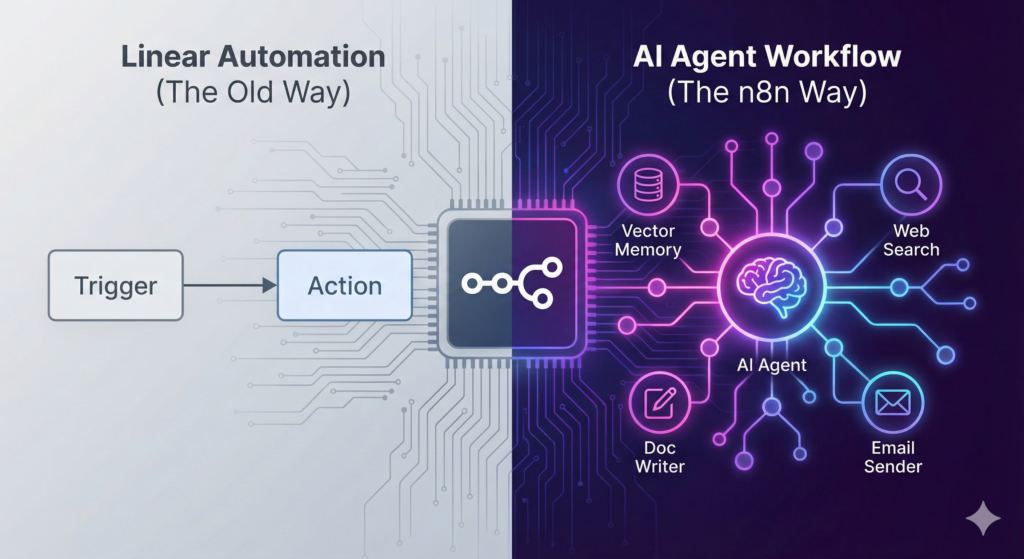
While tools like Make and Zapier are fantastic for linear automations, n8n (nodemation) stands out for two massive reasons: Control and Complexity.
- Self-Hosting & Privacy: You can run n8n on your own server. For AI workflows dealing with sensitive data (like internal docs or customer PII), this is non-negotiable for many enterprises.
- The AI Agent Node: n8n recently introduced dedicated nodes that integrate directly with LangChain. This isn’t just “send a prompt to OpenAI.” This is “give an AI tools and memory so it can act autonomously.”
The Concept: What is an AI Agent in n8n?
In standard automation, you define every step: Step 1, Step 2, Step 3.
In an AI Agent workflow, you define the Goal and the Tools.
You tell the AI: “You are a support assistant. Here is access to our documentation (Vector Store) and our email system (Gmail tool). Go answer user questions.”
The AI then decides… “Okay, I need to look up the answer first, then draft the email, then send it.” It loops and reasons until the job is done.
3 Powerful n8n AI Agent Workflows You Can Build Today
Here are three concrete examples ranging from beginner to advanced.
- The “Gatekeeper” Email Triage Agent
Stop wasting time sorting through your inbox. This agent reads incoming emails, understands the context/sentiment, and routes them accordingly.
- The Setup:
- Trigger: Gmail/Outlook node triggers on “New Email.”
- The Brain (AI Agent Node): Connect a fast, cheap model like Gemini Flash or GPT-4o-mini.
- The Prompt: “Analyze this email. Is it a Sales Lead, a Technical Support Request, or Spam? Output a JSON object.”
- Routing:
- If Sales: Create a card in Trello/Notion and alert the sales team on Slack.
- If Support: Draft a polite auto-reply based on your FAQ and save it as a draft.
- If Spam: Archive it.
Pro Tip: Don’t let the AI send emails automatically at first. Have it create “Drafts” so you can review them. This is the “Human-in-the-Loop” safety net.
- The “Smart Research” Content Generator
This workflow is a lifesaver for content creators and analysts. It doesn’t just write; it researches.
- The Setup:
- Trigger: A keyword entered in a Google Sheet or a Telegram message.
- The Tools: Give the AI Agent node the “HTTP Request” tool or a SerpApi node.
- The Workflow:
- The Agent receives the topic (e.g., “Latest trends in AI 2026”).
- It autonomously performs a Google search to find recent articles.
- It scrapes the content of the top 3 results.
- It synthesizes a blog post draft referencing those specific articles.
- Output: Saves the draft to a Google Doc.
- The Internal Knowledge Bot (RAG)
This is the holy grail for businesses. Chat with your own data without training a custom model.
- The Setup:
- Ingestion: Create a workflow that reads your PDFs/Notion docs, splits them into text chunks, and uploads them to a Vector Store (like Pinecone or Qdrant).
- The Chat Interface: Use n8n’s “Chat Trigger” to create a simple web chat UI.
- The Brain: Connect the AI Agent to the Vector Store Tool.
- The Logic: When a user asks, “What is our refund policy?”, the Agent doesn’t hallucinate. It queries your Vector Store, retrieves the specific paragraph about refunds, and answers: “According to our policy document (page 12), refunds are processed within… “
Why This Matters Now
We are moving away from Chatbots (that just talk) to Agentic Workflows (that do things).
With n8n, you are essentially building a digital employee. You give it a job description (the System Prompt), tools (the Integrations), and supervision (the Human Approval node).
My Advice: Start small. Build the Email Triage agent first. It’s low risk, high reward, and teaches you the fundamentals of structured output from LLMs. Once you see your inbox organizing itself… you’ll never go back.
Happy automating!
#n8n #AIAgents #WorkflowAutomation #NoCode #LowCode #GenerativeAI #LangChain #RAG #BusinessAutomation #ProductivityHacks #TechInnovation #OpenAI #FutureOfWork #DigitalTransformation #BuildInPublic

At JituOnline dot in, he explores the intersection of cutting-edge technology and human lifestyle... whether it's decoding the latest AI models or reviewing the gadgets that define our era, his mission is to make the "limitless realm" of tech accessible to everyone... Join him as he uncovers how tomorrow’s automation elevates today’s living...
- Python’s Magic: How Few Lines of Code Replace Big Code Blocks in Other Languages - June 16, 2026
- Software Development Tools in 2026: What’s Hot, What’s Out - June 1, 2026
- Monthly Roundup of AI Tools in May 2026 - June 1, 2026