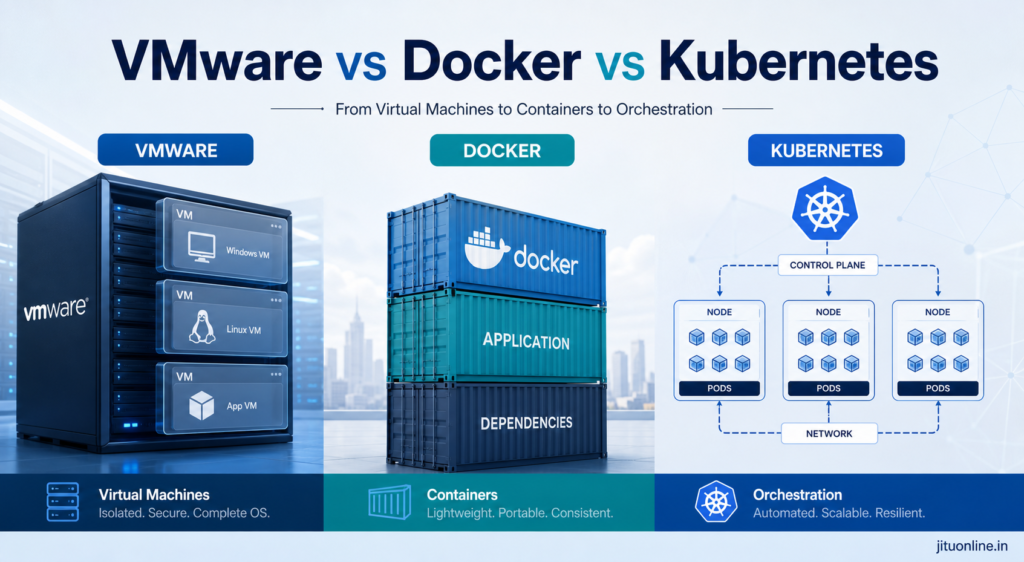
Modern IT teams often talk about VMware, Docker, and Kubernetes as if they are competing tools, but they solve different problems. VMware is mainly for virtual machines and hardware-level isolation, Docker is for packaging applications into lightweight containers, and Kubernetes is for managing containers at scale.
For leaders, the real question is not “Which one is best?” but “Which one fits this workload, this budget, and this operating model?” That is where most architecture mistakes happen.
The simple version
Think of it like this:
- VMware is a full apartment.
- Docker is a furnished room inside a shared building.
- Kubernetes is the building manager who coordinates many rooms.
That simple model is not perfect, but it helps. VMware gives stronger isolation and is often used for legacy systems, mixed operating systems, and environments where stability matters more than density. Docker makes apps faster to package, ship, and run consistently across environments. Kubernetes becomes valuable when you need to run many containers, automate rollout, recover from failure, and scale across clusters.
What VMware does
VMware creates virtual machines, which means one physical server can behave like many separate computers. Each VM has its own operating system, so you can run Windows on one VM and Linux on another on the same hardware.
This is useful when you need:
- Strong isolation.
- Legacy applications that expect a full OS.
- Different operating systems on the same physical host.
- Mature enterprise controls for governance and security.
For many CIOs and infrastructure teams, VMware is still the safest choice when the main goal is to host stable workloads with predictable administration. It is also common in enterprise environments where compliance, backup, snapshotting, and disaster recovery are already built around VM operations.
What Docker does
Docker packages an application and its dependencies into a container. The key advantage is consistency, because the same container can run in development, testing, and production with far fewer environment problems.
Docker is useful when you want:
- Fast app deployment.
- Lightweight runtime overhead.
- Easy local development.
- Repeatable builds for web apps, APIs, and microservices.
For example, if your Python API works on one developer laptop but fails on another because of package versions, Docker can remove that mismatch. You define the runtime once, then the whole team uses the same image. That makes Docker especially valuable for modern software teams that care about speed, portability, and developer productivity.
What Kubernetes does
Kubernetes is not a replacement for Docker in the usual sense. It is a platform for running and managing containers across many servers. It handles scheduling, load balancing, service discovery, auto-scaling, restart policies, and rolling updates.
Kubernetes becomes important when one container is not enough. It is a strong fit when you have:
- Multiple services that must stay online.
- Frequent releases.
- Traffic spikes.
- High availability requirements.
- Multiple teams sharing a platform.
In practice, Docker helps you create and run containers, while Kubernetes helps you run many containers reliably in production. That is why many cloud-native teams use both rather than choosing only one.
When to use VMware
VMware is the right choice when the workload is still very VM-centric or needs strong isolation. It is also a sensible option for older enterprise applications that are not container-ready or would be risky to modernize quickly.
Use VMware when:
- You need to run traditional enterprise apps.
- The app requires a full OS.
- You have mixed Windows and Linux workloads.
- Your operations team is already built around virtualization.
Example: A finance team running a core accounting system on a stable OS version may prefer VMware because the business risk of replatforming is higher than the benefit of containerization.
When to use Docker
Docker is the right choice when the application can be packaged cleanly and you want portability. It is ideal for development teams, CI/CD pipelines, APIs, internal tools, and microservices.
Use Docker when:
- You want the same environment across dev, test, and production.
- You are building modern applications.
- You need fast setup for developers.
- You want to reduce “works on my machine” problems.
Example: A Node.js or Python app with a database connection, API services, and background jobs can often be containerized very quickly. Docker simplifies onboarding and deployment even if the final platform is not Kubernetes.
When to use Kubernetes
Kubernetes is the right choice when you need operational control over many containers. It is especially useful for production systems that must stay available even when individual containers or servers fail.
Use Kubernetes when:
- You have several services running together.
- You need auto-scaling and self-healing.
- You run frequent deployments.
- You need better platform standardization across teams.
Example: A digital commerce platform with web frontends, APIs, payment services, search, and background workers can benefit from Kubernetes because the system needs resilience, scaling, and clean deployment control.
How they work together
A common modern setup is:
- VMware provides the infrastructure layer.
- Docker packages the application.
- Kubernetes runs and manages the containers on top.
This combination is powerful because each layer handles a different job. VMware gives the underlying virtualized environment, Docker simplifies application packaging, and Kubernetes coordinates production operations.
This layered approach is also common in enterprises that are modernizing gradually instead of rebuilding everything at once. It lets teams keep stable legacy systems on VMware while moving new services to containers and Kubernetes where it makes business sense.
Business decision guide
For senior management, the decision should be based on business goals, not technology fashion. Business Need Best Fit Why Legacy enterprise apps VMware Strong isolation, full OS support, low migration risk. Simple app packaging Docker Fast delivery, portability, easy developer workflow. Large-scale container operations Kubernetes Automation, scaling, self-healing, rollout control. Mixed old and new systems VMware + Docker Safe modernization path. Cloud-native platform strategy Docker + Kubernetes Best fit for modern app delivery.
A practical rule is simple: if you are hosting machines, think VMware; if you are packaging applications, think Docker; if you are operating many containers, think Kubernetes.
Common mistakes
One common mistake is trying to force everything into Kubernetes. Not every workload needs it. Small internal apps, simple services, and low-change systems may be better served by Docker alone or even by VMware if the application is legacy.
Another mistake is treating Docker and Kubernetes as if they solve the same problem. Docker packages and runs a container; Kubernetes manages many containers in a production environment. That distinction matters because it affects skills, operations, cost, and support.
A third mistake is ignoring the operating model. Kubernetes brings power, but it also adds complexity. If the team does not have the maturity to run it well, the platform can become harder to support than the apps it is supposed to improve.
Practical migration path
The safest path is usually gradual.
- Keep stable legacy systems on VMware.
- Containerize new services with Docker.
- Introduce Kubernetes only when operations truly need orchestration.
- Standardize CI/CD, monitoring, logging, and security before scaling further.
This approach reduces risk and prevents a big-bang transformation. It also allows IT teams to create a clear modernization roadmap instead of forcing every system into the same architecture.
Leadership perspective
For CEOs and senior managers, the main point is that platform choice should support business speed, reliability, and cost control. VMware is often the right answer for stability and legacy continuity. Docker helps teams build and ship faster. Kubernetes helps organizations scale modern applications in a controlled way.
The winning strategy is usually not “pick one forever.” It is “use the right platform for the right workload.” That mindset avoids unnecessary migration costs and gives the IT team a more realistic modernization path.
Final view
If you want the shortest possible answer, use this:
- Choose VMware for virtual machines, strong isolation, and legacy workloads.
- Choose Docker for portable application packaging and developer speed.
- Choose Kubernetes for production-scale container orchestration and automation.
That is the cleanest way to think about it, and it works well for most enterprise decisions.
References
- Kubernetes vs. Docker: Understanding Container Orchestration and Runtimes
- Docker vs VMWare: How Do They Stack Up?
- Kubernetes vs VMware: Key Differences, Use Cases, Cost, Recovery
- Stateful Containers on vSphere with the Orchestrator of your choice – Docker Swarm or Google Kubernetes

At JituOnline dot in, he explores the intersection of cutting-edge technology and human lifestyle... whether it's decoding the latest AI models or reviewing the gadgets that define our era, his mission is to make the "limitless realm" of tech accessible to everyone... Join him as he uncovers how tomorrow’s automation elevates today’s living...
- Python’s Magic: How Few Lines of Code Replace Big Code Blocks in Other Languages - June 16, 2026
- Software Development Tools in 2026: What’s Hot, What’s Out - June 1, 2026
- Monthly Roundup of AI Tools in May 2026 - June 1, 2026