Google I/O 2026 marks the shift from AI as a copilot to AI as an agentic layer across Google’s core products. This guide explains the major announcements, what they mean for enterprise strategy, and how CEOs, CTOs, and tech leaders should respond.
Google I/O 2026 is not just about new AI models; it signals an agentic era where AI agents act in the background across Search, Gmail, Docs, and Chrome. Read what CEOs, CTOs, and senior tech leaders must do next.
Google I/O 2026, AI agents, Gemini Omni, Gemini 3.5, Gemini Spark, Antigravity 2.0, Google AI, enterprise AI strategy, agentic AI, Google Cloud, AI governance
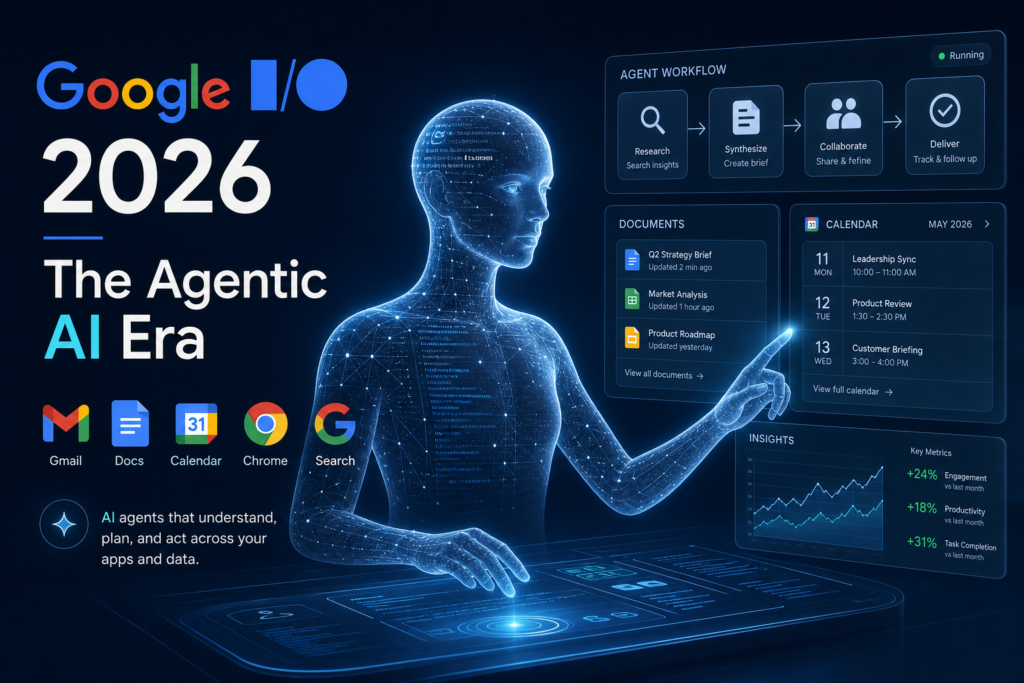
A modern, high‑resolution 3D‑style infographic of an AI agent “working” across icons for Gmail, Docs, Calendar, Chrome, and Search. The agent is represented as a semi‑transparent human‑like figure made of light and code, overseeing workflows, documents, and dashboards. Use a dark blue and teal color palette with subtle glowing edges, giving a professional, enterprise‑tech feel. Text overlay: “Google I/O 2026 – The Agentic AI Era”.
Google I/O 2026: What CEOs, CTOs, and Tech Leaders Need To Know
Google I/O 2026 was not just another developer conference. It marked a quiet but decisive shift from AI as a copilot to AI as an agentic layer running behind the scenes inside Google’s core products.
For CEOs, CTOs, senior managers, and tech leads, I/O 2026 is a signal that AI is no longer mainly about chatboxes and coding assistants. The next phase is about AI agents that can watch, plan, act, and keep working in the background, while your human teams focus on decisions and oversight.
Below is a plain‑English, business‑oriented breakdown of what Google I/O 2026 really changes for strategy, architecture, and day‑to‑day operations.
1. The big theme: AI agents that act, not just answer
Historically, enterprise AI has been about adjacent tools such as chat widgets, code completers, and document assistants. Google I/O 2026 signals that the next wave is continuous, stateful agents that:
- Maintain long‑lived context over your inbox, docs, calendar, and search.
- Run on dedicated infrastructure (often on Google Cloud) without needing your laptop or browser tab to stay open.
- Can spin up sub‑agents, call tools, and chain workflows across apps.
In human‑centric terms:
Instead of “Hey AI, answer this question,” the new pattern is “AI, keep an eye on X and do Y for me over the next week.”
Why this matters for executives
- Products grow a new “risk surface”
An agent that can read Gmail, Sheets, Docs, and internal APIs is effectively a new “privileged user” in your stack. Security, data governance, and audit requirements must treat agents like service accounts with broader permissions. - Expect “agent‑itis” in your org
Once teams see examples like Gemini Spark (see below), they will start building similar background agents for CRM, procurement, compliance, and internal ops. As a CTO, you’ll need a by‑design policy for how agents talk to internal APIs, authenticate, and log everything.
2. Key launches every leader should flag
A) Gemini Omni and Gemini 3.5 series
Google introduced Gemini Omni, a multimodal model that can generate and edit video, audio, and text together, and the Gemini 3.5 series, which includes a “Flash” variant optimized for cheap, fast agent‑style invocations.
In simple terms:
- Gemini Omni is for “create anything from anything”:
- Turn a video snippet into short‑form clips.
- Edit scenes, add characters, or swap voices in generative video.
- Use multimodal inputs (a slide deck + a transcript + a screenshot) and ask for a single coherent output.
- Gemini 3.5 Flash is the “agent‑friendly” model:
- Lower cost per token.
- Designed for high‑throughput, low‑latency workflows such as background agents, chatbots, and real‑time tool calling.
Practical implications
- Monetization and cost planning
If your company runs many AI agents over Gemini 3.5 Flash, you may see lower per‑request cost but much higher total token volume. As a CTO, assume that per‑token pricing will be as important as per‑hour cloud‑cost in 2027. - Multimodal becomes a default expectation
Customer‑facing experiences (self‑service, support, marketing) will increasingly expect: - Video‑to‑text, image‑to‑text, and vice‑versa capabilities out of the box.
- Smart editing workflows (e.g., “trim this 10‑minute video into three 30‑second clips with subtitles in Arabic and English”).
B) Gemini Spark: a 24/7 personal AI agent
Gemini Spark is best described as a 24/7 personal agent that lives inside Gemini (and Google Workspace) and can act on your behalf.
High‑level behavior:
- Always‑on agent
Runs on dedicated virtual machines in Google Cloud; you don’t need your laptop open for it to keep working. - Strong Workspace integration
Out‑of‑the‑box access to Gmail, Docs, Sheets, Slides, Calendar, and more, with built‑in permissioning and enterprise‑grade controls for Gemini Enterprise and Workspace customers. - Agent‑like UX
You can email Spark directly, give it long‑running tasks (“monitor my inbox for customer‑support questions and draft replies”), and come back later to see its progress.
Example use case
A small‑business owner can configure Spark to:
- Scan incoming Gmail for “booking‑style” messages.
- Pull data from a shared Sheet of availabilities.
- Draft a reply proposing a few time slots and CC a manager if the customer is VIP.
Strategic questions for CEOs and CTOs
- Do we want our GTM and support teams to have 24/7 agents watching inboxes and chats?
If yes, you must decide: - What level of autonomy they have (draft only vs. send after approval).
- How quality and brand voice are controlled.
- How will this intersect with existing CRM and helpdesk tools?
Agents like Spark can become “glue” between channels; the risk is creating a shadow agent layer that bypasses your CRM and SLA logic unless you explicitly design the integration.
C) Information agents in Search and “Search Party”
Google is embedding information agents directly into Search that can:
- Run background searches over time for you.
- Aggregate results from multiple sources.
- Summarize findings into a single answer or a “brief” rather than a list of links.
The underlying promise:
You ask a question once, and an agent keeps an eye on new information and notifies you when something changes.
For executives, this means:
- Competitive and market intelligence can become substantially cheaper to run at scale.
- Your teams can set up agents to:
- Track regulation changes.
- Monitor competitor pricing or product launches.
- Curate news around specific projects or regions (e.g., GCC‑specific compliance updates).
D) Antigravity 2.0 and managed agents in the Gemini API
Antigravity is Google’s agent‑first development platform; at I/O 2026 it graduated to Antigravity 2.0, with new capabilities for orchestrating specialized sub‑agents and managing agent sandboxes.
Developer‑side changes:
- Managed agents via the Gemini API
You can now create a fully provisioned agent with a single API call, with a remote sandbox and built‑in tooling. - Antigravity CLI and SDK
- A new CLI lets you spin up and manage agents from the terminal.
- An Antigravity SDK exposes the same agent harness Google uses internally, so you can host agents on your own infrastructure if you prefer.
Example architecture pattern
# Pseudocode: a simple agent that watches a shared inbox
def watch_inbox_agent():
    while True:
        emails = fetch_gmail_inbox(
            query="is:unread from:customer-support@example.com"
        )
        for email in emails:
            # Use Gemini 3.5 Flash to draft a reply
            reply_draft = call_gemini(
                model="gemini-3.5-flash",
                prompt="Draft a polite reply to this customer email...",
                context=email.text
            )
            # Submit to approval queue (human or L2 bot)
            send_for_approval(email.id, reply_draft)
        sleep(60)  # Check every minute
This same pattern can be ported to:
- Procurement agents that watch supplier portals and flag price changes.
- Compliance agents that pull new regulation documents and highlight changes against your internal policies.
E) WebMCP and Chrome’s “agents‑first” tools
Google introduced WebMCP, a proposed open web standard that lets web apps expose structured tools (e.g., JavaScript functions, forms, APIs) so that browser‑based AI agents can call them reliably.
On Chrome, they also showed:
- Chrome DevTools for agents
Agents can now: - Run quality audits.
- Emulate user sessions.
- Debug and optimize front‑end code with tooling inspired by DevTools.[2]
For product leaders, this means:
- Web apps must start thinking in terms of “agent‑facing APIs” written in MCP‑style formats.
- Front‑end teams will need to:
- Add machine‑readable descriptions of actions (“book slot”, “add to cart”, “submit support ticket”).
- Ensure those actions return predictable, structured outputs so agents can chain them.
3. What this means for your AI strategy
a) 2026–2027: The “agent‑first” year
Google’s message is clear:
The next competitive advantage will not be who has the biggest model, but who best orchestrates agents across products.
Action items for leaders:
- Form a “agent governance” working group
- Define what kinds of agents are allowed (e.g., “agent that can read data but not write”) and under what conditions.
- Decide how logging, cost attribution, and audit trails will work for each agent class.
- Inventory your current “agent‑like” workflows
Today many companies already have: - RPA bots.
- Chatbots that call internal APIs.
- Workflow scripts that auto‑respond to Slack/Teams.
Bring these into one taxonomy and plan how they will migrate to an agent‑first platform (e.g., Antigravity or similar).
b) Re‑evaluate your cloud and AI vendor mix
With Google aggressively integrating:
- Gemini models
- Agent infrastructure (Antigravity, managed agents)
- Google Workspace
- Chrome and Search
… the “Google ecosystem” becomes a natural home for internal agent workloads. That forces a hard question:
- Should your core AI agents live on Google’s managed stack (Gemini + Antigravity + Workspace) or on a multi‑vendor stack (e.g., OpenAI/Claude + Kubernetes)?
The tradeoff:
- Google stack
Pros: tight integration with Gmail, Docs, Sheets, and Search; easier to enforce security and governance centrally.
Cons: lock‑in to Google’s roadmap and pricing model. - Multi‑vendor stack
Pros: more model choice, freedom to swap vendors.
Cons: more engineering overhead to stitch everything together.
c) Prepare for “background‑agent” UX
Gemini Spark and similar products will normalize the idea that:
- There is an always‑on agent somewhere in your digital life.
- You can hand it complex, multi‑step tasks and return to it later.
For product leaders:
- Design your own products with agent‑workflow thinking:
- What long‑running tasks can your users delegate?
- How will they track progress?
- How will they correct or override the agent’s decisions?
A simple example in a SaaS product:
- Instead of “generate a report and show it,” the UX becomes:
- “Watch this data set and notify me when X metric drops below Y,”
where an agent maintains the watch and periodically updates the user.
4. Risk and governance angles every C‑suite should see
1. Data leakage via agents
An agent that can:
- Read Gmail
- Read Sheets
- Call internal APIs
is effectively a privileged service account that can be mis‑prompted.
Mitigation steps:
- Fine‑grained permissions per agent
- Some agents can only read.
- Some can only write to specific destinations.
- Mandatory “human‑in‑the‑loop” for critical actions
- Approve before sending emails to customers.
- Approve before changing pricing or contracts.
- Strong logging and search
- Log every agent action (what it read, what it wrote, what tools it called).
- Make it easy for compliance officers to reconstruct “what did the agent do on this customer file?”.
2. Over‑automation and loss of institutional knowledge
If agents increasingly:
- Draft replies.
- Create meeting notes.
- Update trackers.
… there is a real risk that people stop reading or fully understanding the context. You can end up with “agent‑mediated silos” where no one really owns the underlying process.
Countermeasures:
- Define “agent boundaries” for each process
- Example: “the agent can draft a proposal, but a human must sign off and record the rationale in the CRM.”
- Require periodic human reviews
- Rotate who reviews agent behavior for a given workflow.
- Track how often humans override or edit agent outputs.
3. Legal and contractual exposure
If your agents:
- Send customer‑facing emails.
- Update pricing or contracts.
- Interact with external systems…
… regulators and lawyers will ask:
- Who is legally responsible when the agent makes a mistake?
- How is consent obtained for automated decision‑making?
Best‑practice questions to ask your legal team:
- Should you explicitly disclose to customers that certain communications are drafted or triggered by an AI agent?
- Do your existing contracts distinguish between “automated systems” and “human decision‑makers”?
5. Concrete next steps for your organization
Here are practical, executive‑level actions you can take in the next 3–6 months.
For the CEO / board
- Ask your CTO:
- “How many agent‑like workflows do we already run, and where are they?”
- “What is our plan for governing agents that can read or write our data?”
- Commission a 1‑pager on “agent strategy”
Describe: - Which parts of the business will adopt agents first (support, sales, ops).
- Which vendors you’ll standardize on and why.
For the CTO / tech leadership
- Pick one pilot use case
For example: - An agent that monitors customer‑support inboxes and drafts replies.
- An agent that watches procurement dashboards and flags price changes.
Build it on a platform like Antigravity + Gemini 3.5 Flash and treat it as a learning sandbox. - Define an agent‑governance framework
At minimum, document: - Permission levels (read only, write only, full access).
- Audit and logging requirements.
- Approval workflows for high‑risk actions.
- Start integrating “agent‑ready” APIs into key products
Add structured, machine‑readable endpoints for: - “create order”
- “update customer status”
- “flag as high‑risk”
so that future agents can call them reliably.
For product leaders
- Redesign at least one workflow with “agent‑first” thinking
Take a current manual process (e.g., onboarding a new customer) and ask: - What can be delegated to an agent?
- What must stay human?
Then sketch an agent‑assisted version. - Plan for agent‑centric UX
- Progress indicators for long‑running agent tasks.
- Easy ways to “stop”, “pause”, or “override” an agent.
- Clear visual separation between “agent‑generated” and “human‑edited” content.
6. Bottom line for CEOs, CTOs, and tech leads
Google I/O 2026 is not a “model‑of‑the‑year” event; it is the launch of an agents‑as‑a‑platform era. Gemini Spark, Antigravity 2.0, managed agents in the Gemini API, and WebMCP are all pieces of the same puzzle: Google wants to be the operating system for agents that live inside Search, Gmail, Docs, and the browser.
For businesses, the acceleration looks like this:
- 2025–2026: AI helps you write emails, draft code, and summarize documents.
- 2026–2027: AI agents watch your workflows and take action on your behalf, while your human staff focuses on higher‑level decisions and oversight.
If you’re leading a tech‑heavy organization, your job now is to get ahead of the agent‑first wave:
design governance, pick your stack, and start small pilots before your teams start building shadow agent systems that bypass your architecture and security controls.
FAQ: Google I/O 2026 for Enterprises
Q: What is the single biggest shift shown at Google I/O 2026?
A: The single biggest shift is from AI as a copilot that answers questions to AI as an agentic layer that can watch, plan, and act across your apps (Search, Gmail, Docs, Workspace, Chrome).
Q: Should every company adopt Gemini Spark?
A: Not immediately. You should start with governance first. Decide which teams and workflows can use agents, how much autonomy they get, and how they integrate with your existing CRM, helpdesk, and security controls.
Q: How does Antigravity 2.0 help enterprises?
A: Antigravity 2.0 gives development teams a platform to build, deploy, and manage AI agents in a controlled environment. It handles orchestration, tool use, sandboxes, and logging so your org can scale agent‑based workflows without losing control.
Q: Is the “agent‑first” world safe for regulated industries?
A: It can be, but only if you design safety and governance in from day one. Key elements: least‑privilege permissions, human‑in‑the‑loop approval for critical actions, strong logging, and clear accountability for every decision made by AI agents.
Q: How should CEOs start their AI agent strategy?
A: Start with a small pilot in one business area (support, sales, ops, or compliance), define a clear agent‑governance policy, and treat the first project as a learning exercise, not a full‑organization rollout.
Q: Do I need to switch to Google Cloud to use these agent features?
A: Many of Google’s agent tools are tightly integrated with Google Cloud and Workspace, but you can combine them with other cloud providers if you carefully design IAM, API access, and observability. The key is standardization, not vendor lock‑in.
Reference
- Google I/O 2026 official event site
- Google Developers Blog, All the news from the Google I/O 2026 Developer keynote
- Google Blog, I/O 2026: Welcome to the agentic Gemini era
- Google Blog, Google I/O 2026: News and announcements
- Google Cloud Blog, Innovations from Google I/O 26 on Google Cloud
- TechCrunch, Google introduces Gemini Spark, a 24/7 agentic assistant with Gmail integration
- The Verge, Google I/O 2026: All the news and announcements
- WIRED, Everything Announced at Google I/O 2026
- Business Insider, Google I/O 2026: 5 Biggest Takeaways, Including AI Advances
- CNET, Google I/O 2026 Live: Gemini Omni, Smart Glasses and More AI
- PCMag, Google I/O 2026 Live: Here’s Everything Google Just Announced
- TechWireAsia, Google I/O 2026 recap: AI agents, Gemini, smart glasses, and more
- Google Cloud AI Agent Trends 2026 report
- Google Developers, WebMCP and agent-friendly web patterns

At JituOnline dot in, he explores the intersection of cutting-edge technology and human lifestyle... whether it's decoding the latest AI models or reviewing the gadgets that define our era, his mission is to make the "limitless realm" of tech accessible to everyone... Join him as he uncovers how tomorrow’s automation elevates today’s living...
- Python’s Magic: How Few Lines of Code Replace Big Code Blocks in Other Languages - June 16, 2026
- Software Development Tools in 2026: What’s Hot, What’s Out - June 1, 2026
- Monthly Roundup of AI Tools in May 2026 - June 1, 2026